● RECFor web app reviews
Review a web app out loud.
Use the app and say what you see. Voicetrail records the pages, your voice, your clicks and the errors underneath on one timeline, then writes up the issues. Your team gets a link. Your coding agent gets the whole thing over MCP.
Chrome, Edge, Brave and other Chromium browsers. Card required; cancel before day 15 and you pay nothing.
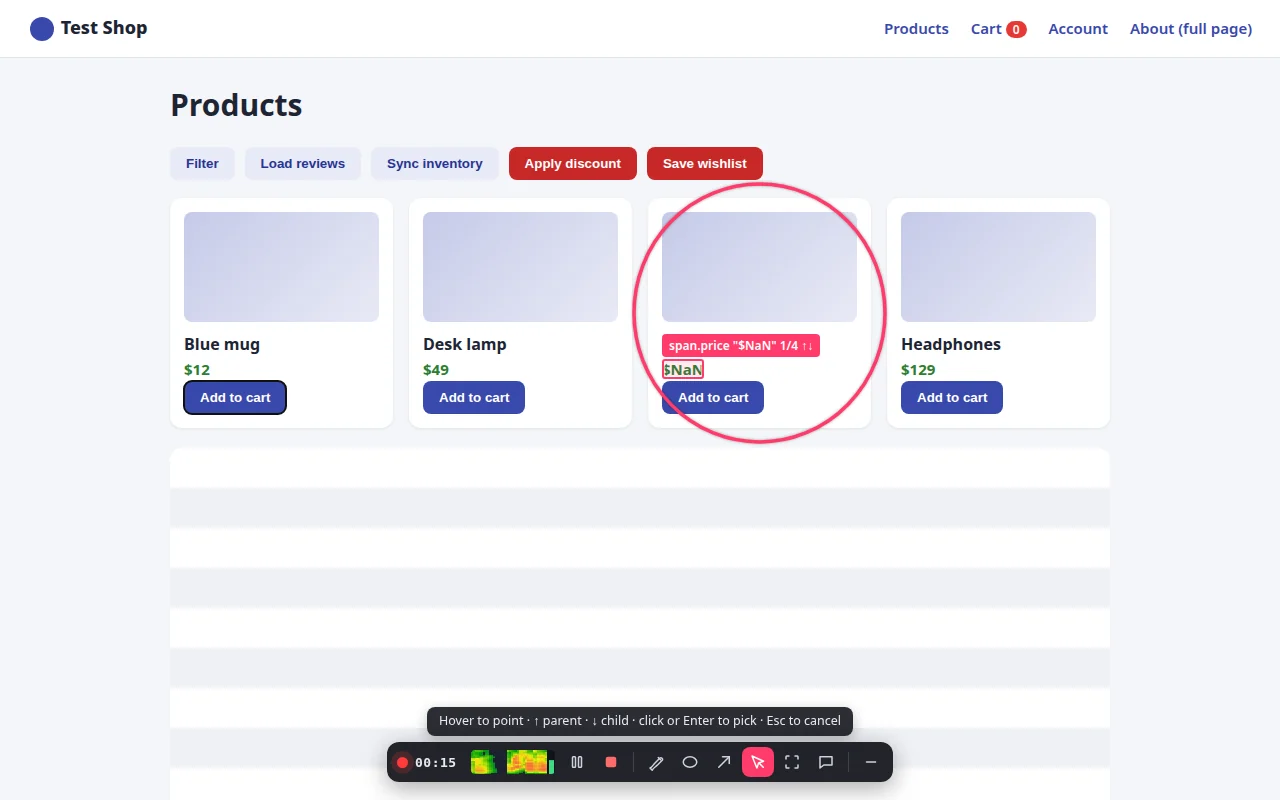
Recording our test shop: the reviewer circles a card and points at a broken price.
One review, one timeline
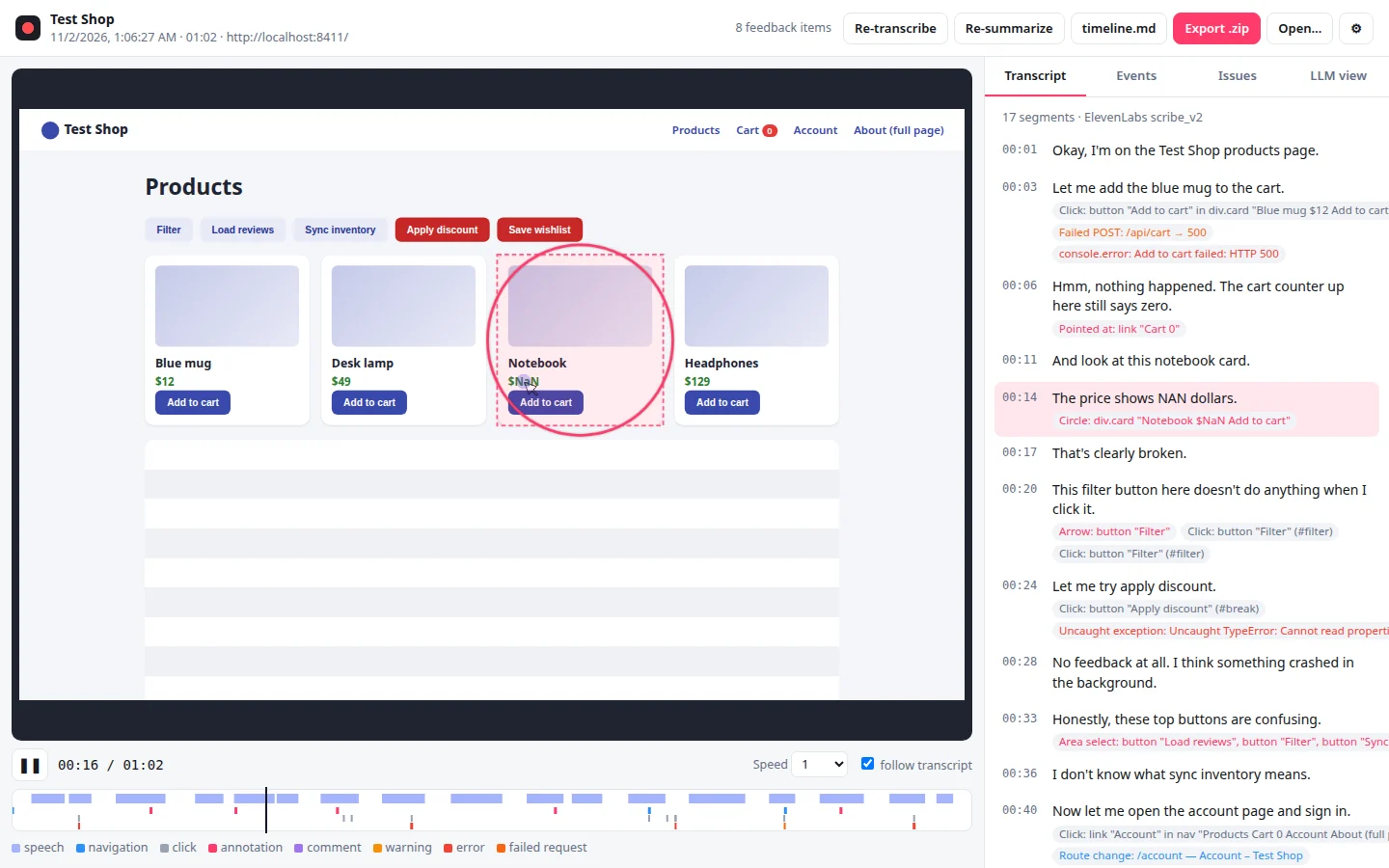
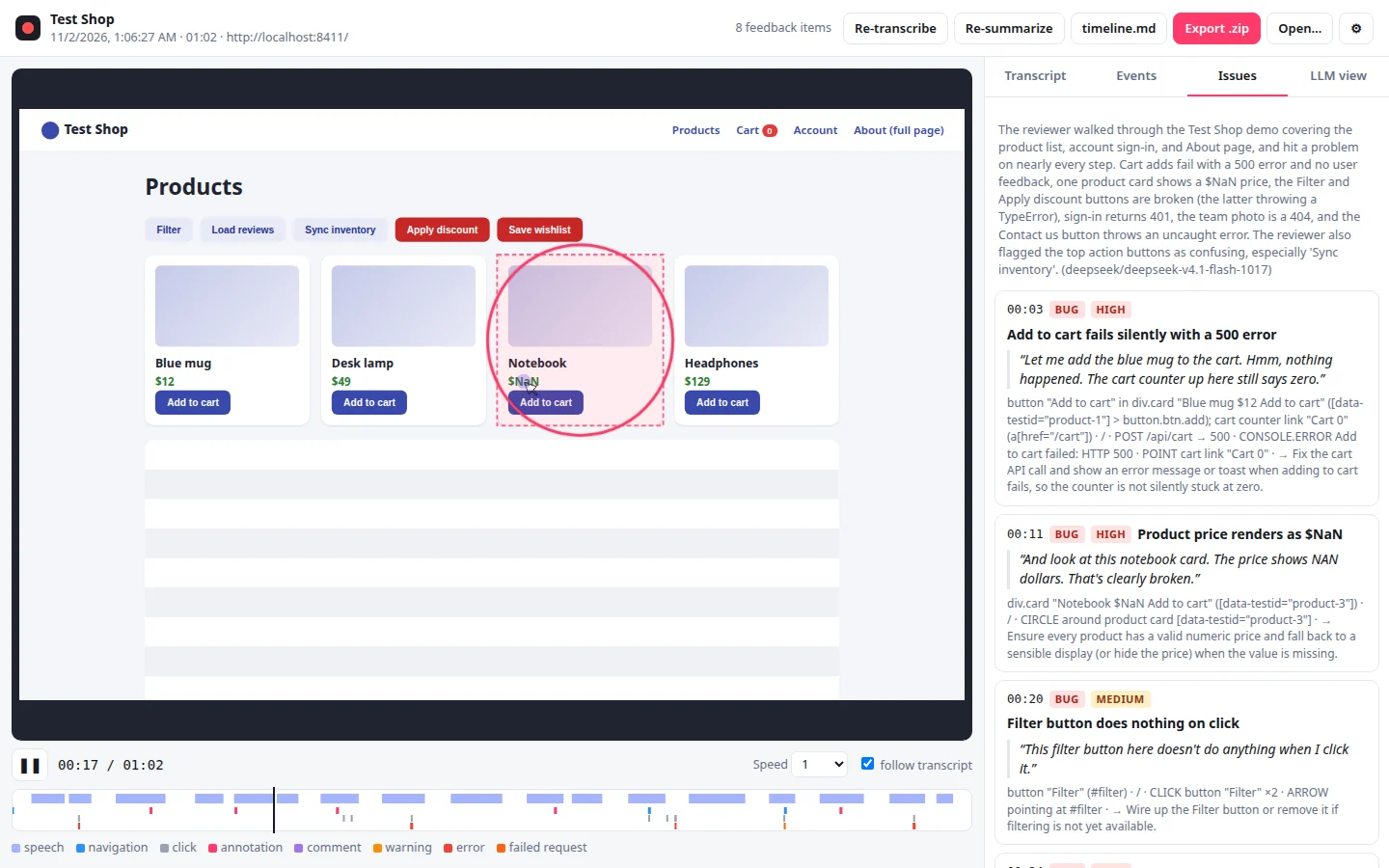
Real data from the recording above
00:12What it records
Everything a bug report leaves out.
A good review is what someone says while using the product. Voicetrail keeps that, and lines it up with what the page was doing at the same second.
- Page
A replay of the page itself, not a video
The page structure and every change to it, so text stays sharp at any zoom and a 10-minute review is a few megabytes.
- Voice
What you said, with live captions
Your microphone, transcribed while you talk and again after you stop, with a timestamp on every sentence.
- Clicks
Clicks, typing, scrolling, page changes
Each click names the element and its CSS selector. Passwords, card numbers and codes are hidden before upload.
- Marks
What you pointed at
Pick an element, circle it, draw an arrow, drag a box or type a comment. Each mark records the elements under it.
- Errors
Console errors and failed requests
Exceptions, rejected promises, console errors and every request that came back 400+ or never arrived.
- Issues
The issue list
An AI pass groups what you said into issues, each with your quote, the element, the page and the errors around it.
00:31How it works
Four steps, and only one of them is work.
- 01
Start on the tab
Open the app you want to review and press Start, or Alt+Shift+R. It works on production, staging and localhost.
- 02
Use it and talk
Click around and say what you notice. When you say "this button", point at it with the picker.
- 03
Stop
The recording uploads to your workspace. A minute later it has a transcript and an issue list.
- 04
Hand it over
Send the link to your team, or ask your coding agent to fetch the review and fix it.
00:58For coding agents
Your agent reads the review, not a video.
Every recording comes with timeline.md: what you said, merged with what happened at that second, with CSS selectors, errors and screenshot references. A 10-minute review is a few thousand tokens.
Connect Claude Code, Cursor, ChatGPT or any MCP client once. Then ask for the review by name.
you ›
Get my latest Voicetrail review and fix the issues.
# Feedback session: Test Shop
- Recorded: 2026-11-01 18:06 UTC, length 01:02
- App: http://localhost:8411
## Feedback items (AI summary)
- [00:03] (bug, high) Add to cart fails silently with a 500 error — button "Add to cart" in div.card "Blue mug $12 Add to cart" ([data-testid="product-1"] > button.btn.add); cart counter link "Cart 0" (a[href="/cart"]) — "Let me add the blue mug to the cart. Hmm, nothing happened. The cart counter up here still says zero."
- [00:11] (bug, high) Product price renders as $NaN — div.card "Notebook $NaN Add to cart" ([data-testid="product-3"]) — "And look at this notebook card. The price shows NAN dollars. That's clearly broken."
- [00:20] (bug, medium) Filter button does nothing on click — button "Filter" (#filter) — "This filter button here doesn't do anything when I click it."
## Timeline
00:00 page / "Test Shop"
00:01 SAY "Okay, I'm on the Test Shop products page."
00:03 SAY "Let me add the blue mug to the cart."
00:04 CLICK button "Add to cart" in div.card "Blue mug $12 Add to cart" ([data-testid="product-1"] > button.btn.add) [shots/001.jpg]
00:04 NET.FAIL POST /api/cart → 500
00:04 CONSOLE.ERROR Add to cart failed: HTTP 500
00:06 SAY "Hmm, nothing happened. The cart counter up here still says zero."
00:09 POINT at: link "Cart 0" in nav "Products Cart 0 Account About (full page)" (a[href="/cart"]) [shots/002.jpg]
00:11 SAY "And look at this notebook card."
00:14 SAY "The price shows NAN dollars."
00:14 CIRCLE around: div.card "Notebook $NaN Add to cart" ([data-testid="product-3"]) [shots/003.jpg]
00:17 SAY "That's clearly broken."
00:20 SAY "This filter button here doesn't do anything when I click it."
00:21 ARROW pointing at: button "Filter" (#filter) [shots/004.jpg]
00:21 CLICK button "Filter" (#filter) ×2
00:24 SAY "Let me try apply discount."
00:26 CLICK button "Apply discount" (#break)
00:26 EXCEPTION Uncaught TypeError: Cannot read properties of undefined (reading 'percent') at /app.js:30:86
…01:20Who it's for
Anyone who has to explain what's wrong with a screen.
QA testers
Test the way you think out loud and skip the write-up. Every bug arrives with steps, the element, the console error and the failed request.
Product managers and designers
Walk through a build and say what bothers you. Engineers get your words next to the exact screen and element.
People building with AI coding agents
Review what your agent built, then let the same agent pull the review over MCP and fix it. No copying screenshots into chat.
Agencies reviewing client sites
Record a pass over a staging site and share the link with the client or the developers, with every issue already listed.
01:47Compared with video
Why not just send a screen recording?
Video is fine for showing someone a flow. For fixing it, the developer (or the agent) needs to know which element you meant and what broke underneath.
| Question | A screen recording | A Voicetrail recording |
|---|---|---|
| Which element is "this"? | You guess from the pixels | The element you pointed at, with its CSS selector |
| Errors behind the screen | Not in the video | Console errors and failed requests at the second they happened |
| Size of 10 minutes | Tens or hundreds of MB | A few MB, most of it audio |
| What an agent can read | Frames, through a vision model | A text timeline of a few thousand tokens |
| Finding a moment | Scrub and watch | Search the transcript, click a line, jump there |
| Text on screen | Compressed, blurry when zoomed | Real text, sharp at any zoom |
02:05Privacy
Hidden in the browser, before it leaves.
Masking runs in the extension, so masked text is never uploaded. Recording happens only in the tab you started, between Start and Stop.
How we handle recordingsStandard masking, on by default
Passwords, card numbers, one-time codes, token-like fields and secrets in URLs are replaced with dots.
Strict masking for real customer data
All typed text and all page text become asterisks, screenshots turn off. The layout still replays.
Allowed domains
Admins can limit recording to your own sites, like
*.staging.yourco.com.Retention you choose
One year by default, or 30 or 90 days. Deleted recordings are gone for good after 7 days.
02:30Pricing
$27 a seat a month. 10 hours each, pooled.
Or $22 a month billed yearly. People who only watch are free. Start with a 14-day trial and 3 recording hours. Prices in USD, + tax where applicable.
02:51Questions
FAQ
Is it a screen recorder?
No. Voicetrail records the page itself (its structure and every change to it) instead of pixels. The replay stays sharp at any zoom, a 10-minute review is a few megabytes, and every click is tied to the exact element that was clicked, with a CSS selector.
Which browsers does it work in?
Chrome, Edge, Brave, Arc, Opera and Vivaldi on desktop. Firefox and Safari aren't supported.
Do I need to add code to my app?
No. It's a browser extension, so it works on any site you can open: production, staging or localhost. Site owners can optionally mark elements with data-fbr-mask or data-fbr-block to hide them from every recording.
What does the AI do with my recording?
ElevenLabs transcribes your voice. Then a language model reads the text timeline (what you said, merged with what happened on the page) and groups it into issues. It only sees text, never audio or screenshots, and it doesn't train on your data.
Which coding agents can use it?
Anything that speaks MCP: Claude Code, Claude.ai and Claude Desktop, ChatGPT, Cursor, VS Code with Copilot, Windsurf, Codex CLI and Gemini CLI. Your agent runs on your own subscription; Voicetrail only serves the data.
What languages does it understand?
Transcription is done by ElevenLabs Scribe, which handles more than 90 languages, including Spanish, French, German, Portuguese, Japanese and Vietnamese. We test the issue list mostly in English today.
What happens when the trial ends?
The trial lasts 14 days and includes 3 recording hours. A card is required to start. If you don't cancel, it becomes a Team subscription on day 15; we email you 7 days before. Cancel during the trial and you pay nothing.
What if we run out of hours?
Live captions pause for the rest of the month, and everything else keeps working. You can buy 10 more hours for $12. Recordings past 150% of your hours still upload, and are processed next month or when you add hours.
Record your next review instead of writing it.
14 days, 3 hours of recording, then $27 a seat a month.